Business Solutions  Manufacturing Vendortrak
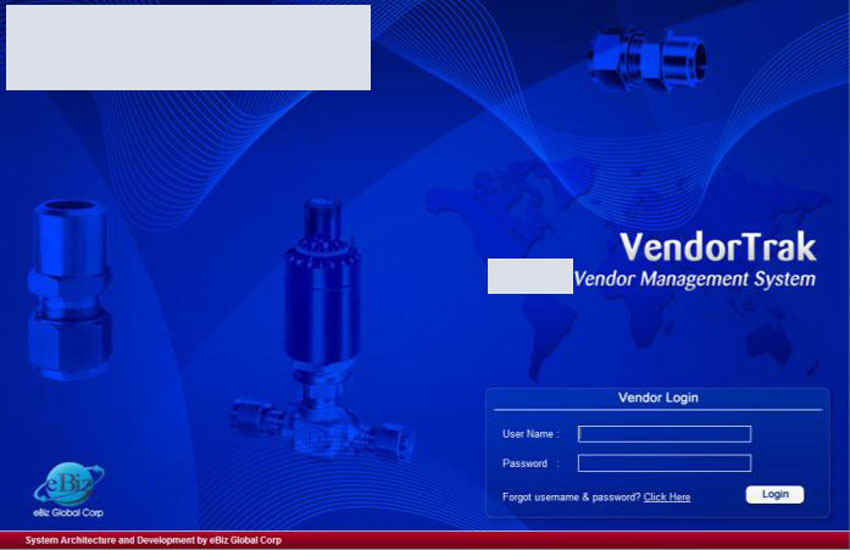
Purchasing is crucial for a smooth Supply Chain. Unforeseen delays in procurement can impact as missed deliverables to Customers with cost penalties. Playing it safe with excess inventory could mean potential loss of margin as inventory carrying costs. The challenge therefore is to maintain a delicate balance between these two opposing objectives by empowering all stakeholders with round the clock access to information; and that is exactly what VendorTrak does.
VendorTrak Highlights
Separate login's for Suppliers, Company Purchasing Groups and Purchasing Manager
Supplier login,
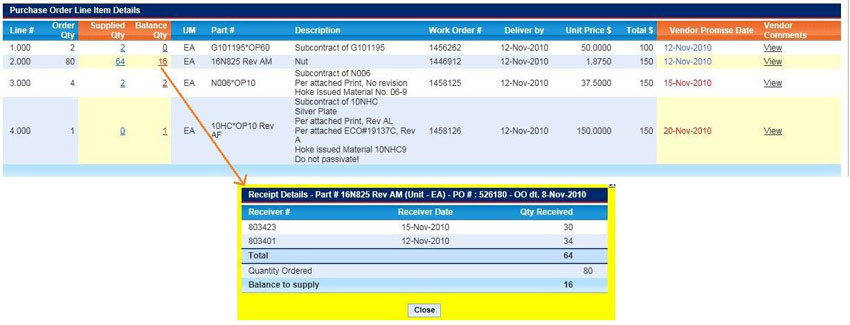
- On login, a Supplier can readily access information waiting for action under ‘Urgent Action Needed’. This includes new PO’s from Company, new comments or documents for PO’s in process from Company, materials to be replenished based on Company’s planning run and a quick view of all promised delivery schedules
- While accepting / acknowledging a PO, Supplier can indicate line item wise if there is a change in the promised delivery date and enter comments to explain same. All delayed dates are highlighted in red to draw attention on both sides. Replenishment deliveries can be broken into multiple deliveries line item wise
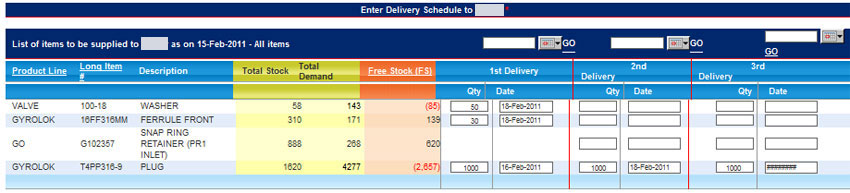
- c. At any given time Supplier can review unfulfilled PO's and see line item wise the order quantity, supplied quantity and balance quantity
- d. DocuTrak gives access to Company's Receiver documents, payment vouchers, payments, debit memos DocuTrak gives access to Company's Receiver documents, payment vouchers, payments, debit memos integrated view; for example, a fulfilled PO will have access to all receiver documents posted by Company with respect to that PO
Company Purchasing Group login,
- In addition to above, on login, Purchasing Group can readily view all PO's pulled from Company's ERP or back-end legacy system and PO's acknowledged by Supplier with date and name of acknowledger highlighted in yellow
- Purchasing Group and Suppliers can collaborate by posting comments, sharing documents (e.g., latest drawings / specifications) PO wise in respective tabs
- c. Purchasing Groups can also view across Suppliers all partially fulfilled PO's, fulfilled PO's, delivery
Company Purchasing Manager login,
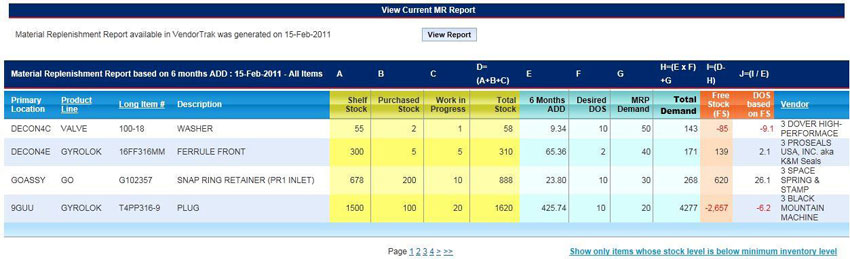
- In addition to all of above, on login, Purchasing Manager can generate a new ADD (Average Daily Demand) Report anytime based on three, six and 12 month periods. Report will show among other things, total stock, ADD, desired DOS (Days Of Supply), MRP demand, free stock and thus replenishment quantity to be supplied. Relevant portion of the report immediately becomes available to Suppliers for any replenishment action, if needed
- b. Purchasing Manager can review any special PO's that need approval; all such approvals are maintained with date and user stamp for SOX compliance
ROI Highlights
If access to a computer, internet and VendorTrak is available, there will hardly be any need for either Supplier or Company to seek procurement related information via phone or email or fax from each other, however small or big the Supplier is
VendorTrak typically relies on existing ERP or other legacy systems for master data such as material #'s and Supplier master to maintain a single source of truth everywhere; no change in legacy system is required to deploy VendorTrak
Audit trail for special approvals are available with details required for SOX compliance
eBiz will develop and deploy DMS on a fixed fee basis; no risk of never ending T&M (Time and Material) IT projects. eBiz offers AMC (Annual Maintenance Contract) option post warranty for added peace of mind